YouTube
NxStrutel UI Fork
strudel
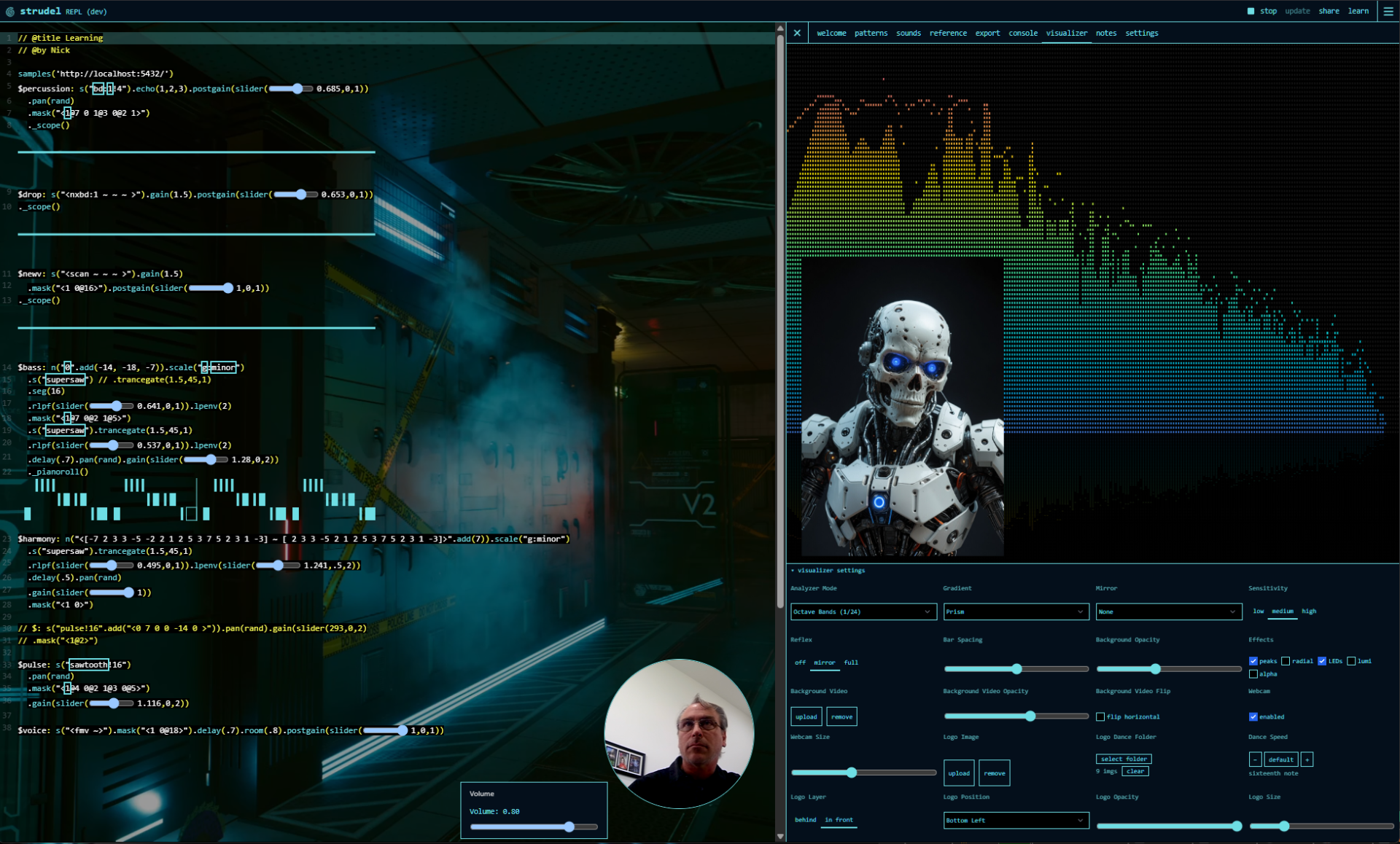
In the not serious parts of my day, I've been goofing off teaching AI to write music with code. There's an amazing robust community using tools, one of the popular ones being Strudel. Well the tool itself is remarkable. Interface seemed a little bit bland and one of my favorite aspects of open source is we can pick it up and do anything we want with it. I forked the code and made something pretty good looking with it..... Unfortunately I'm still terrible at making music with the tool.... I'm going to focus on teaching AI to make music. : )
This fork represents the remarkable work of the Strudel team at its core. My contribution has been modest UI updates only, designed to increase capabilities, aesthetics, streaming and content creation workflows, and minor quality of life elements.
See the updated Strudel UI in action
Custom Modifications Overview
This fork of Strudel includes several substantial UI and experience enhancements built on top of the core live-coding engine:
1. Persistent Notes Tab
A dedicated markdown documentation interface integrated into the main REPL. Allows users to maintain session notes, jam logs, and pattern documentation directly alongside their live code. Notes persist across sessions and are editable in real-time.
2. Pattern Highlighting & Navigation
Enhanced pattern list UI with visual feedback—the currently-edited pattern is highlighted with high-contrast selection styling (black text on selection color), making it easier to track which pattern you're working on in multi-pattern sessions.
3. Rich Visual Feedback
- Dynamic Visualizations: Real-time audio visualization tied to pattern playback
- Background Video Layer: Aesthetic background video integration for immersive jamming sessions
- Animated Avatar: Dancing avatar that responds to music playback, providing visual synchronization cues
4. Custom REPL Themes
Multiple built-in color themes for the REPL editor, allowing users to customize the aesthetic of the coding environment. Includes support for switching themes on the fly.
5. Pattern Bridge Architecture
A bridge system (bridge/pattern.strudel) enables external pattern files to be loaded and executed, supporting a modular workflow where patterns can be version-controlled and reloaded with sub-second latency.
6. Local Sample Management
Integration with local Dirt Samples and custom sample banks via:
- Settings Prebake configuration
- Soundboard interface at
http://localhost:9100/soundboard.html - Support for both GitHub-hosted and local sample repositories
7. Native Webcamera Integration
Embed live webcamera video natively into patterns for live coding performances, streaming, and content creation. Seamlessly layer video alongside audio synthesis and visualizations.
8. Optimized Key Bindings
Custom keyboard shortcuts for common operations:
- Ctrl+Enter: Execute code
- Ctrl+.: Stop playback
- Shift+Alt+Up: Duplicate line
All modifications maintain compatibility with the core Strudel live-coding API and documentation while extending the user experience for local development and jamming workflows.
- Try the original here: https://strudel.cc
- Docs: https://strudel.cc/learn
- Source: https://codeberg.org/uzu/strudel/